

HubSpot For SugarAI keeps your SugarAI Contacts, Leads and Accounts in sync with HubSpot contacts and companies, in one direction or both. Records sync in real time or on a schedule, with field mapping you control and no duplicates.
User Guide
How records move between Sugar and HubSpot once the integration is set up, and what to check when something does not arrive.
How syncing works
- Matching: HubSpot ID, then Sugar ID, then email (people) or domain and name (companies).
- Leads vs Contacts: HubSpot contacts in the Lead stage become Sugar Leads; all others become Contacts.
- Retries: records that fail to send are retried every 5 minutes, up to 10 times.
- Run sync now on Sync Settings runs the scheduled syncs immediately.
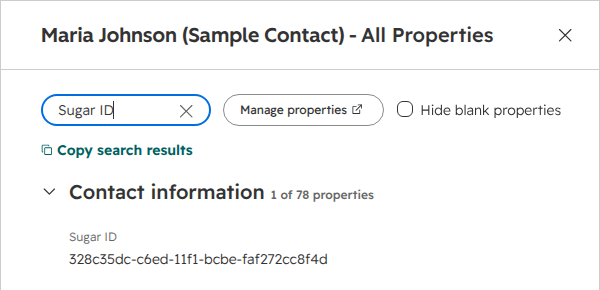
Each linked HubSpot record shows the Sugar record ID in its Sugar ID property:
Activity Log
The Activity Log tab lists every record sent, received, skipped or failed, with the reason.
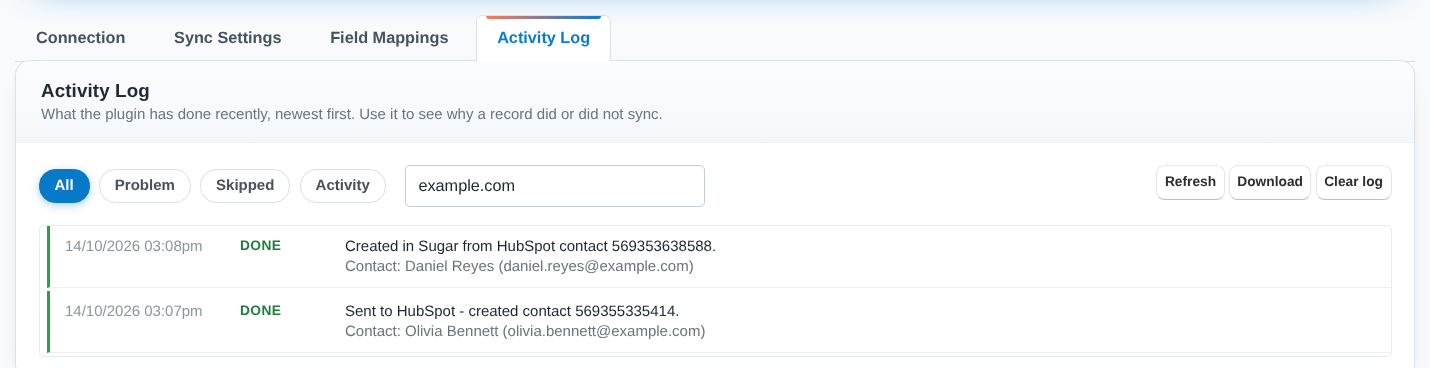
Filter by Problem, Skipped or Activity, search by name or email, open Technical details, or Download the log. Entries older than 30 days are removed automatically.
Troubleshooting
- HubSpot rejected the access token - paste the token again and click Test Connection.
- The access token is missing HubSpot permissions - tick the listed scopes on the private app, then Test Connection.
- No field mapping is set up for ... - save a field mapping for that module.
- The record has no email address - add an email address and save the record again.
- The plugin licence is not valid - validate the key on License Configuration, then Save Settings.
Nothing arrives from HubSpot? Check the pull switches are saved and cron is running, then click Run sync now.
Are deletions synced? No; deleting a record in one system leaves the other alone.
Uninstalling
Use Admin > Module Loader > Uninstall. The plugin settings, schedulers and log are removed; the HubSpot ID field, all Sugar records and all HubSpot data are kept.
 Saving Comment...