

Provident Connector for Fireflies syncs your meeting summaries, action items, and full searchable transcripts straight into SugarAI — and routes each call to the right opportunity, account, lead, or contact. Automatically. Every time.
Admin Guide
Fireflies.ai Integration for SugarAI — Administrator Guide
This guide is for SugarAI administrators who manage the Fireflies.ai integration day to day. It covers the admin panel, every configurable setting, the security/exclusion filter system, scheduling, manual sync, diagnostics, logging, and runtime troubleshooting. For the install/upgrade workflow, see the Installation Guide.
Audience: SugarAI system administrators.
What you can do from this guide: configure how transcripts flow into SugarAI, restrict what gets synced (privacy, title, host, meeting type), choose between Calls and Meetings as the target module, control auto-task creation, monitor sync runs, and read the audit trail.
Where to find it: Admin → Administration → Fireflies.ai Integration.
1. What the Integration Does
On every sync run — manual or scheduled — the integration:
- Calls the Fireflies GraphQL API at
https://api.fireflies.ai/graphqlusing your API key, paged up to 1,000 transcripts per run, scoped to the configured number of days back. - For each transcript, applies the configured security filters (privacy, title-exclude, host-email allow-list, meeting-type allow-list, and the optional CRM-match requirement). Filtered-out transcripts are counted separately and never written to SugarAI.
- Looks up an existing record by
fireflies_id_c(then byfireflies_url_cas a fallback). If found, it's updated. If not, a new record is created in the target module (Calls or Meetings). - Populates standard fields (
name,status,direction,duration,start/enddates,description) and five custom fields (Fireflies ID, URL, Main Points, Sentiment, Actions). - Tries to assign the record to a SugarAI user that matches the meeting host email. If no match, falls back to the admin user.
- Loops through the participant email list and links matching Contacts, Leads, and Accounts. For accounts it skips common consumer email domains (
gmail.com,yahoo.com, etc.) so personal addresses don't accidentally link to a corporate account. - Looks for a related Opportunity to set as the parent, first by joining linked contacts, then by fuzzy title match.
- If Create Tasks from Action Items is on, creates a Task for each action item with a default due date of +7 days, parented to the new record.
- On every run, soft-deletes any previously-synced record that no longer passes the current filters (this is the
deletedcount in the result JSON).
Two big-picture concepts to keep in mind:
- Target module — the integration only writes to one of Calls or Meetings per workspace. Switching mid-flight will leave prior records orphaned and stop updating them. Pick once.
- Filter enforcement — filters apply on every run, not just on first sync. If you tighten a filter later, transcripts that no longer pass will be soft-deleted on the next run.
2. The Admin Panel at a Glance
Open Admin → Fireflies.ai Integration. The page has four sections, top to bottom:
| Section | What it Shows / Does |
|---|---|
| Configuration | Every setting you can change. Save Settings posts to a CSRF-protected endpoint. |
| Connection Status | The Test Connection button. Calls Fireflies' user query and reports your user, email, transcript count, and minutes consumed. |
| Manual Sync | The Sync Now button. Runs a sync over the last 30 days and returns a JSON result. |
| Current Configuration | A read-only summary of effective values. Useful for verifying that a save took effect. |
How settings are stored: every setting is written to the standard SugarAI config table under category = 'fireflies'. The API key is encrypted with Blowfish before being saved (Sugar's blowfishEncode helper) and decrypted on read. Other values are stored as plain strings. Nothing lives in a custom table.
3. Configuration Reference
3.1 Connection
| Field | Default | What it Does |
|---|---|---|
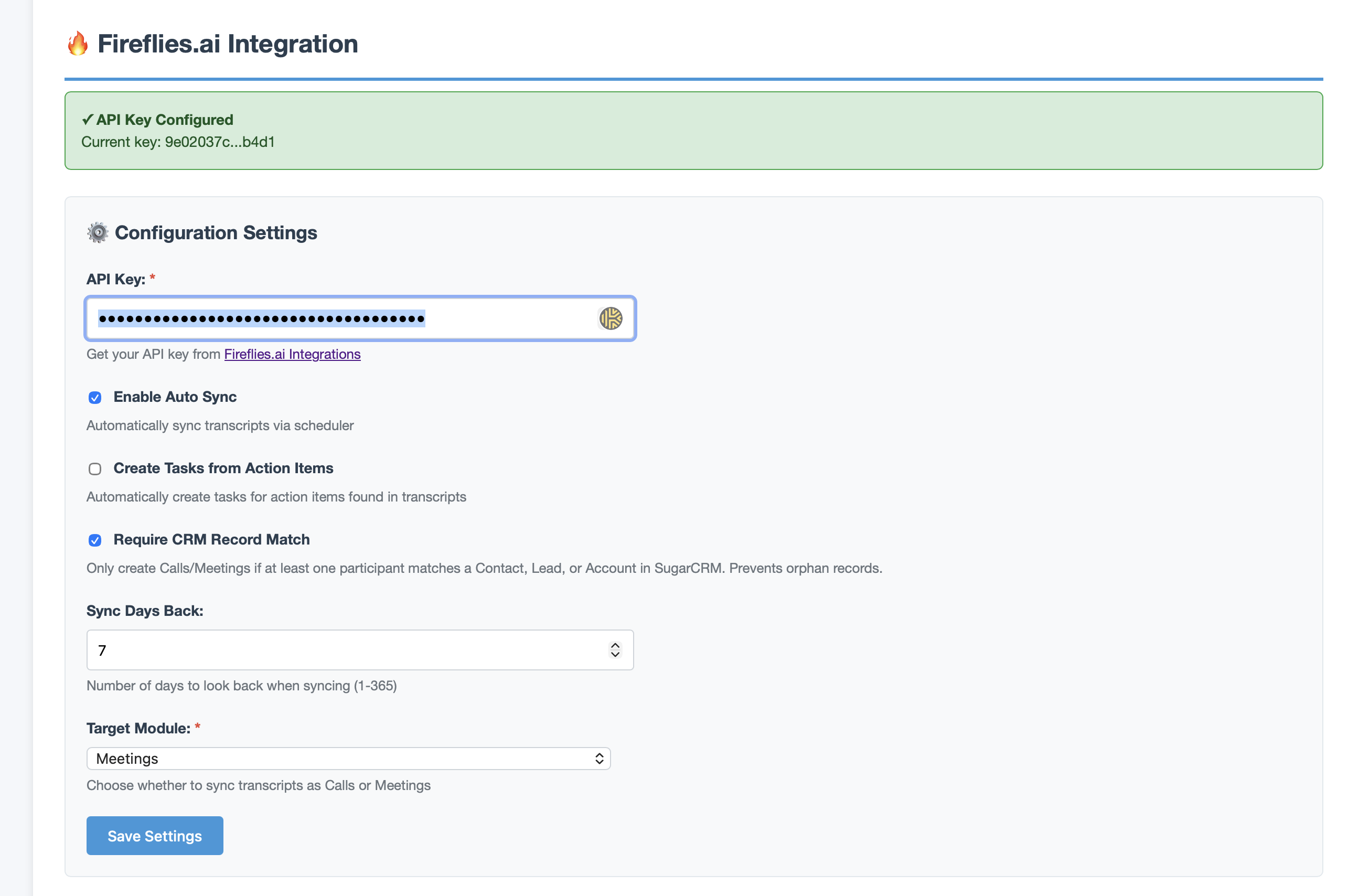
| API Key | (empty) | Your Fireflies.ai API key. Generated at fireflies.ai → Settings → Developer Settings. The field is masked in the UI (first 8 + last 4 characters shown). Required. |
| Test Connection | (button) | Calls Fireflies' user{} query. On success, returns user_id, email, name, num_transcripts, minutes_consumed. On failure, returns the API's error message. |
3.2 Sync Behavior
| Field | Default | What it Does |
|---|---|---|
| Enable Auto Sync | On | Master switch for the scheduled job. If off, only Sync Now runs work; the scheduler exits early. |
| Target Module | Calls | Where each transcript becomes a record — Calls or Meetings. Switching this is destructive (see Section 1). |
| Sync Days Back | 7 | How far back each run looks. Range 1–365. The 7-day default works well with a 15-minute scheduler. Larger windows mean more API pages and more re-checks of older transcripts. |
| Create Tasks from Action Items | On | When on, every action item in a transcript becomes a Task with status "Not Started", priority Medium, and due date +7 days. Parent record is the Call/Meeting. |
| Log Level | info | error · warn · info · debug. info is recommended for production. debug emits per-transcript reasoning and should only be enabled briefly while troubleshooting (see Section 7). |
3.3 Security & Exclusion Filters
Use these to keep sensitive transcripts out of SugarAI. Every filter applies on every sync run; transcripts that fail filtering are counted as filtered and never reach the target module. If a previously-synced record stops passing filters, it's soft-deleted on the next run.
| Filter | Type | Behavior |
|---|---|---|
| Filter Privacy | Allow-list (CSV) | Comma-separated list of privacy levels (e.g. team,public). Empty = no privacy filter. Matching is case-insensitive. |
| Filter Title Exclude | Block-list (CSV) | If the transcript title contains any of these substrings (case-insensitive), it's skipped. Useful for excluding "Personal", "1:1", "Internal" meetings. |
| Filter Host Emails | Allow-list (CSV) | If non-empty, only transcripts hosted by these email addresses sync. Checked against host_email and organizer_email. |
| Filter Meeting Types | Allow-list (CSV) | If non-empty, only transcripts whose summary.meeting_type matches one of these values sync. |
| Require CRM Match | Boolean | When on, a new record is only created if at least one participant maps to an existing Contact, Lead, or Account in SugarAI. Existing records are unaffected. |
Filter ordering: filters short-circuit on the first failure. The order checked is: privacy → title exclusion → host emails → meeting type → CRM-match. The integration logs the rejection reason at info level (e.g. Skipped 'Project review': title contains 'review') so you can audit.
4. The Scheduler Job
4.1 What the Package Registers
The package registers a scheduler task definition called Fireflies Sync Job that calls fireflies_sync_job() in custom/modules/Schedulers/jobs/FirefliesSync.php. This appears in Sugar's scheduler UI under the standard Job dropdown after install + Quick Repair.
4.2 Creating the Scheduler Row
The integration registers the job but does not auto-create an active scheduler row. You must create one once:
- Open Admin → Scheduler → Create Scheduler.
- Set Job Name to
Fireflies Sync(or any descriptive label). - Set Job to Fireflies Sync Job.
- Set Status to Active.
- Set Interval to
*/15 * * * *(every 15 minutes) as a common starting point. Match it to your team's expectation of how soon a transcript should appear in SugarAI after Fireflies finishes processing it. - Save.
5 Test Connection
Confirms that:
- The configured API key is correct.
- Outbound HTTPS to
api.fireflies.aiworks from this Sugar host. - The Fireflies user behind the key has API access.
On success it shows your Fireflies user, email, transcript count, and minutes consumed. On failure it surfaces the API's error message — most often a 401 (key wrong/revoked) or a network error (firewall blocking api.fireflies.ai).
6. Designing Your Filter Policy
6.1 Common Policies
Customer-only sync
Goal: keep internal/personal transcripts out of CRM.
- Filter Title Exclude:
internal, personal, 1:1, all-hands, standup - Require CRM Match: On — transcripts only sync if at least one participant maps to a Contact, Lead, or Account.
Sales-only sync
Goal: only sync external customer-facing meetings hosted by the sales team.
- Filter Host Emails:
sales-rep1@yourco.com,sales-rep2@yourco.com,... - Filter Title Exclude:
demo prep, internal, retro
Privacy-tier policy
Goal: never sync transcripts marked Private in Fireflies.
- Filter Privacy:
team,public— leaves out anything marked private/personal.
6.2 Test Before You Tighten
Filters are enforced on existing records too. If you tighten a filter, the next sync run will soft-delete any record that no longer passes. Before pushing a stricter filter to production:
- Drop log level to
debug. - Click Sync Now.
- Read the log to see which transcripts would now be filtered (look for
Fireflies skipped '':). - Read the
deletedcount in the result JSON. If non-zero, those records will be soft-deleted on the next live run. - Adjust and repeat until satisfied. Then revert log level to
info.
"Soft-deleted" means recoverable: filter-driven deletes use Sugar's standard mark_deleted, which sets deleted = 1 in the database. The record is hidden from list views but remains in calls/meetings (and calls_cstm/meetings_cstm). You can restore one by toggling deleted = 0 directly, or by re-loosening the filter and letting the next sync re-create from the Fireflies side.
For a deeper look at field mappings, dashlet behavior, and what end users will see in synced records, see the User Guide. For known code-quality and security observations across the package, see the Code Review Notes.
 Saving Comment...

-
"Currently recording meetings but not archiving any notes etc into Sugar. Our Sugar provider is looking into this but no resolution so far." - Eilish McCann
Read More Reviews

