
Provident Connector for Fireflies syncs your meeting summaries, action items, and full searchable transcripts straight into SugarAI — and routes each call to the right opportunity, account, lead, or contact. Automatically. Every time.
Manually logging meeting notes and action items into your CRM can be time-consuming. The Fireflies.ai and SugarAI integration automates this process by syncing meeting transcripts, summaries, and tasks to your Sugar records, ensuring every customer interaction is well-documented and easily accessible.
Your sales calls are happening. Your CRM has no idea.
Fireflies captures every call. Sugar runs your pipeline. But the data between them only travels one way — through your reps, copying summaries, retyping action items, marking calls "held," and guessing how long the meeting actually ran. Every minute spent on admin is a minute not spent selling. And every detail that doesn’t make it into your CRM is a detail SugarAI can’t use to coach, forecast, or surface the next best step.
What that costs you, every week:
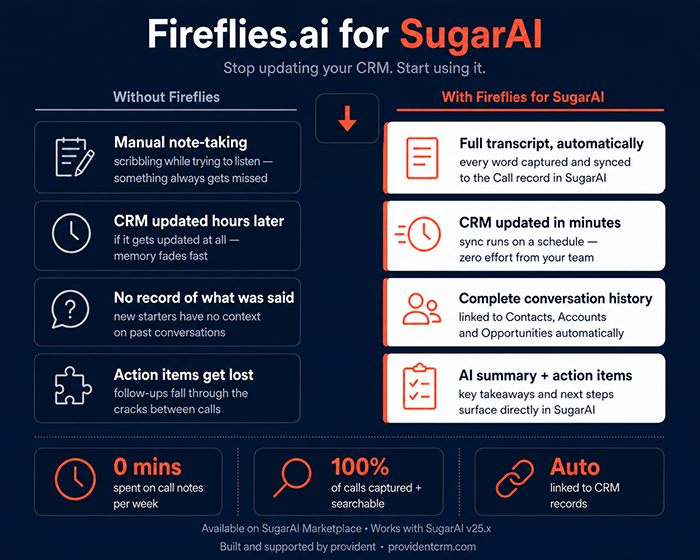
- Reps copy-pasting Fireflies summaries into Sugar — every. single. call.
- Action items end up in three different tools and get followed up in none.
- Meeting durations, attendees and statuses entered from memory (or not at all).
- Outlook-synced meetings get duplicated when transcripts arrive.
- SugarAI’s account and opportunity insights miss the most important data: what was actually said on the call.
Provident Connector for Fireflies. Built for Sugar.
The Connector closes the loop. The moment a Fireflies call ends, the summary, key points, exact duration and full searchable transcript appear in Sugar — attached to the right opportunity, account, lead or contact. No copy-paste. No duplicate meetings. No "held" checkboxes left untouched. Reps walk into the next call already prepped. SugarAI walks in already smarter. You will need a Fireflies.ai account and for best results we recommend their Business plan.
Why teams choose Provident Fireflies Connector
1. Smart, opportunity-aware routing
The Connector matches every participant against your CRM, then attaches the meeting to the open opportunity — falling back to the account, lead or contact only if no opportunity exists. No more orphaned activities or guessing where the call belongs.
2. Updates existing meetings — goodbye duplication
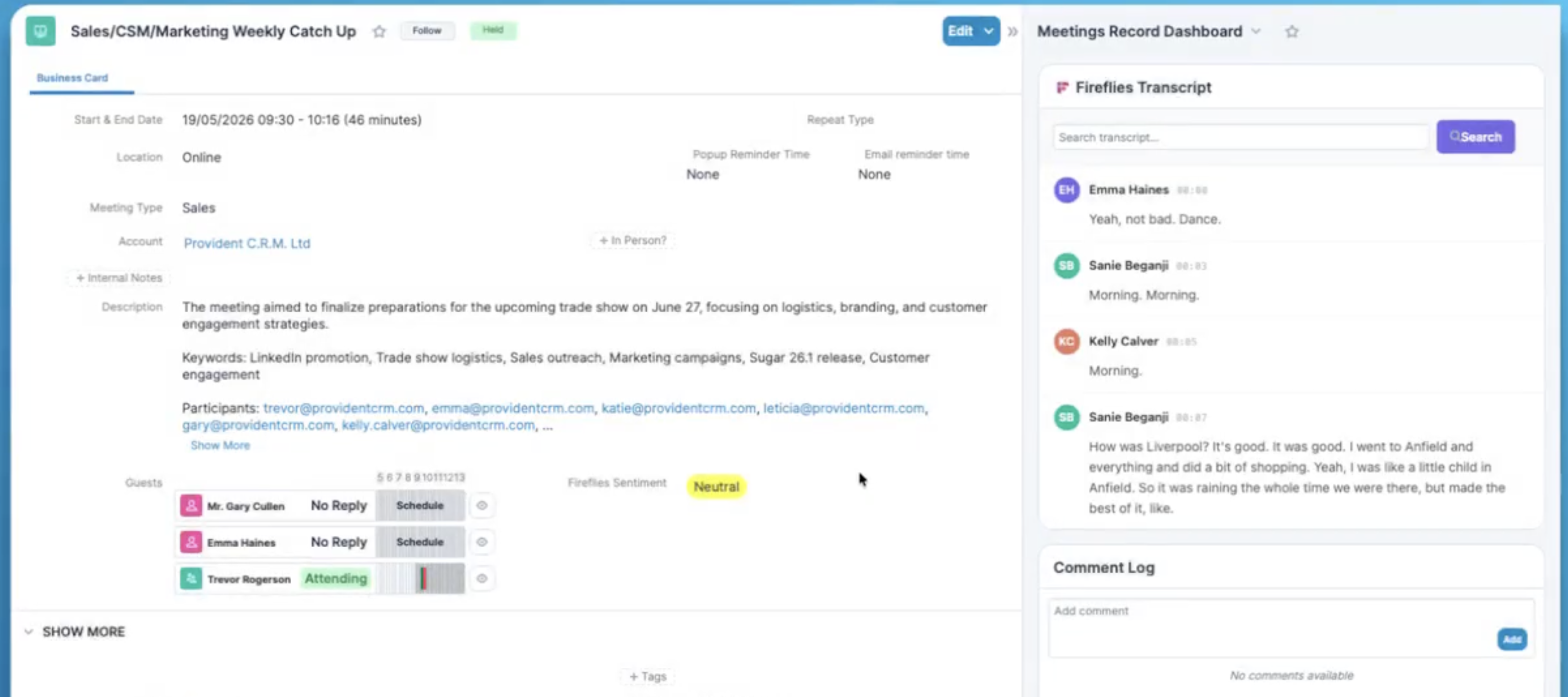 If the meeting was already in Sugar from Outlook (via Sugar Connect or any calendar sync), the Connector finds it, switches the status to Held, sets the exact duration, adds the real attendee list (including anyone who joined unexpectedly), and merges in the summary. Your calendar stays clean.
3. A searchable, live transcript inside Sugar
Read the meeting summary, search the transcript by keyword (every match highlighted), and jump straight to that moment in Fireflies. No tab-switching. No "do you remember what they said about pricing?"
4. Feeds SugarAI the data it’s been missing
Summaries and main points flow into Sugar’s own AI, so opportunity- and account-level AI insights are based on what actually happened on the call — not what someone typed up afterwards. Map any of your configured AI skills to the sync; the Connector brings the right output back into the right field.
5. Configurable, secure, admin-friendly
A guided admin panel walks you through authentication, security filters, AI-skill mapping and scheduler settings — with a one-click connection test. Granular controls let you respect Fireflies private teams, whitelist hosts, and require a verified CRM match before any call syncs (so internal stand-ups, recruitment chats and partner calls never end up in customer records).
6. Action items become tasks in Sugar
Turn on action-item creation and the Connector will add follow-up tasks to Sugar straight from the call summary — assigned, dated and tied to the same opportunity or account.
How it works
- Connect Fireflies to Sugar. A guided admin panel walks you through authentication, security filters, AI-skill mapping and scheduler settings. Test your connection with one click.
- Run your meetings as you always have. Fireflies records and transcribes. You don’t change a thing.
- The connector routes the call into Sugar. Participants get matched. The open opportunity (or account, lead or contact) gets the meeting. The existing calendar entry gets updated. Summary, main points and live transcript appear in Sugar.
- Sales runs faster. SugarAI gets smarter. Reps prep in seconds with searchable transcripts and accurate summaries. SugarAI generates account- and opportunity-level intelligence from real call content.
Security & control
You decide what syncs. By default the Connector respects Fireflies private team settings and restricts visibility on synced calls to the participants only. You can require a verified CRM match on every call — so internal meetings never end up in customer records by mistake. Whitelist trusted hosts. Schedule the sync to run as often or as rarely as you like. Every option is configurable from the Sugar admin panel.
Built for sales teams that hate admin
- Sales reps — walk into every meeting prepped, end every meeting with a clean Sugar record.
- Sales managers — pipeline reviews based on what was said on the call, not what was typed up after it.
- RevOps & Sugar admins — a Sugar-native integration with the security filters and admin controls you actually need.
- SugarAI users — close the data loop so opportunity- and account-level AI insights reflect every conversation.
Try it on your own pipeline
30 days free. No credit card. Install from the Sugar Marketplace.
See for yourself why teams running Sugar choose Provident’s Connector for Fireflies.
FAQ
Do my reps need to change how they run meetings?
No. Fireflies records the call as it always does. The Connector handles the rest.
What if the meeting was already in Sugar from Outlook?
The Connector finds the existing record and updates it — status, duration, attendees, summary, key points. No duplicate meetings, no manual cleanup.
What if there’s no matching contact, lead or account on the call?
You decide. The Connector can skip the call entirely (recommended for internal meetings — turn on the "require CRM match" rule), hold it in the transcripts list for manual matching, or — depending on your configuration — create a new contact from the participant list.
Will the full transcript clog up Sugar?
No. Transcripts are streamed live from Fireflies and shown inline in Sugar — searchable, with every keyword match highlighted — but not stored as bulk text. You get the searchable benefit without the data bloat. The summary and main points are stored, so your reporting and SugarAI both have what they need.
Does it work with our existing security model?
Yes. Fireflies private team settings are respected. You can lock down sync to participants only. And the "require CRM match" rule keeps internal calls out of customer records.
Which Sugar editions does it support?
Configurable for any Sugar edition that supports activities (calls and meetings). Talk to us about your specific configuration during the trial setup.
Which Fireflies.ai editions does it support?
You will require an active Fireflies.ai account. The integration does work with the free version, but it's very limited due to many features it relies on being part of the Pro/Business/Enterprise plans. It is recommended that you use a subscription plan to get the most value from the integration.
How do I get help during setup?
Documentation walks you through every option in the admin panel. Provident’s team is on hand throughout the 30-day trial — book the optional onboarding call when you install.

-
"Currently recording meetings but not archiving any notes etc into Sugar. Our Sugar provider is looking into this but no resolution so far." - Eilish McCann
Read More Reviews