

Chat with your SugarAI data directly within Claude Desktop to get instant, personalised insights. Query key CRM modules like contacts, opportunities, accounts, and cases based on your permissions, all without switching contexts. Your data stays secure while enabling smarter, faster decision-making with accurate, real-time customer information.
Plugin is free to use - just contact us to download.
Claude subscription and SugarAI user required to connect both applications.
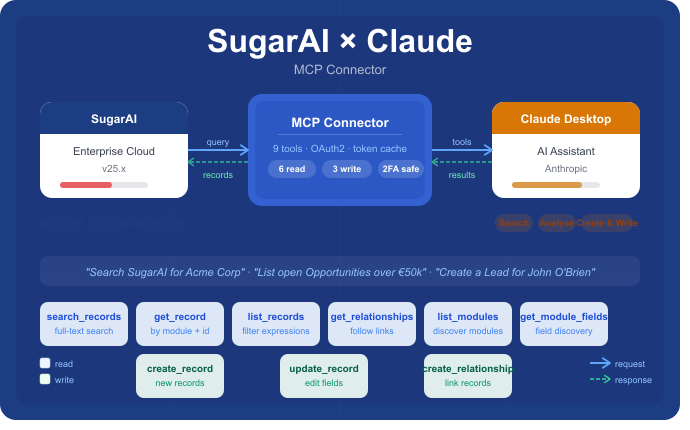
The SugarAI MCP Connector brings your live CRM data directly into Claude Desktop, turning natural language into real-time CRM actions. Ask questions in plain English — search records, filter by any field, follow relationships between accounts, contacts and opportunities, or create and update records — all without leaving the conversation. No navigation, no context switching, no training required. Whether you're a sales rep preparing for a call, a manager reviewing pipeline, or an ops lead cleaning up data quality, the connector puts your entire CRM at your fingertips through a single conversation window.
For years, CRM systems have demanded that users learn their structure, navigate their modules and speak their language. The SugarAI MCP Connector flips that relationship entirely. Instead of adapting to the CRM, the CRM adapts to you. You describe what you need in the same language you'd use with a colleague, and Claude handles the rest — querying records, traversing relationships, aggregating data and presenting the results in a format that's immediately useful.
Built specifically for SugarAI and Claude Desktop, the connector works seamlessly alongside two-factor authentication using a dedicated API user. Tokens are cached and refreshed automatically in the background, so your session stays live without interruption. A simple setup wizard handles the full installation on both Mac and Windows in under five minutes, with no technical knowledge required. Once connected, there's nothing to maintain — it just works.
Nine Tools. One Conversation. Your Entire CRM, Instantly Accessible.
Read
- search_records — full-text search across all modules or a named list
- get_record — fetch a single record by module and id
- list_records — filter-based listing using field/operator expressions
- get_relationships — related records via a named link (contacts, opportunities, cases etc.)
- list_modules — enumerate all modules on the instance
- get_module_fields — discover field names, types and labels for any module
Write
- create_record — create a new record in any module
- update_record — update fields on an existing record
- create_relationship — link two existing records together
What You Can Do
Account Summaries
"Give me a full briefing on Acme Corp — their open opportunities, recent activity, key contacts and any open cases"
Claude pulls the account, follows the relationships to contacts, opportunities, cases and calls, then writes a structured summary — ready before a client meeting. What would previously have taken five minutes of clicking across modules now takes seconds, and the output is already formatted for sharing or pasting into a meeting note.
Pipeline Reports
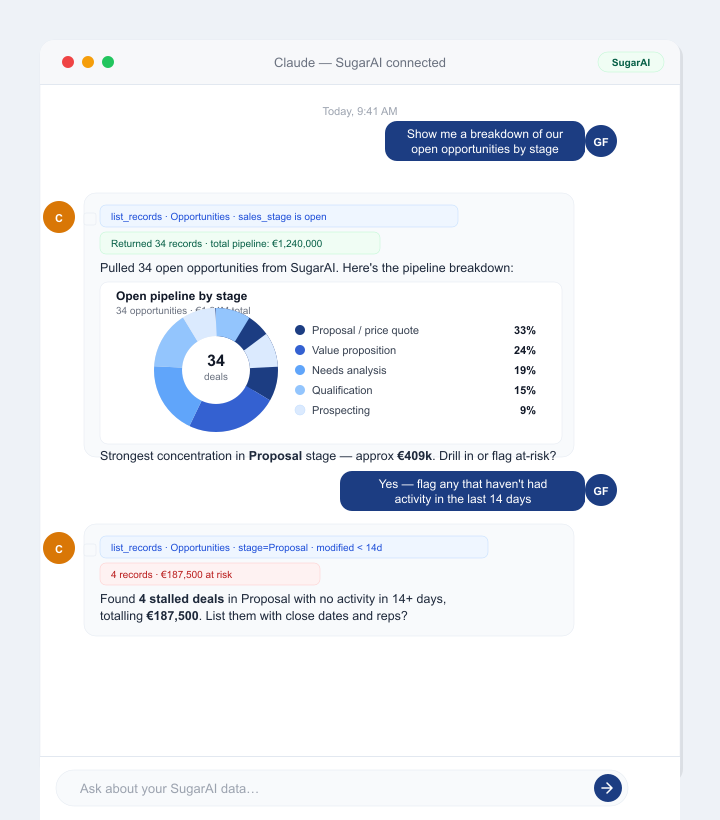
"Summarise our open pipeline in Ireland — group by stage, show total value and flag anything closing this month"
Claude lists and aggregates the opportunities, then formats a clean report with totals and highlights. No exports, no spreadsheets, no pivot tables. Just ask, and the answer is there — ready for a Monday morning team call or a board update.
Best Next Steps
"Look at this account — what would you suggest as the next action based on their stage and recent activity?"
Claude reviews the opportunity stage, last contact date and open tasks, then recommends a follow-up action grounded in the actual data. It's not generic advice — it's a recommendation built from what's really happening in your CRM right now.
At-Risk Deals
"Which opportunities have had no activity in the last 30 days and are closing this quarter?"
Claude filters by date modified and close date, then flags the deals most at risk of slipping. Sales managers can run this check in seconds rather than building saved reports or relying on someone else to pull the numbers.
Contact Prep
"I have a call with Sarah Murphy tomorrow — what do I need to know?"
Claude finds the contact, their account, open opportunities, recent calls and any open cases — all in one briefing. Turn up to every call fully prepared, without opening a single browser tab.
Data Quality
"Find Accounts in Ireland with no contacts linked"
Claude runs the filter and lists the gaps — instantly actionable for a data clean-up. Tasks that used to require a data analyst or a custom report can now be done conversationally in real time, by anyone on the team.
The SugarAI MCP Connector is the fastest way to close the gap between your CRM and the people who use it every day. It removes the friction that causes data to go unstored, follow-ups to be missed and pipeline visibility to suffer. If your team is already using Claude Desktop, connecting it to SugarAI takes minutes — and the productivity gain is immediate.

